

AI agents write the code. Who's thinking about security?
AI agents such as Claude Code, Cursor and Codex are now part of my daily work. I've written about this before, but that post focused on where they speed things up and where they mislead. This one goes into a single topic: how do I keep code secure while writing it with AI agents?
Rather than explain it in theory, I'll use a real feature running on this site: AI Check, a tool that analyses text for signs of AI writing and runs entirely locally. I'll share the real security decisions I faced while building it, the precautions I took, and where I did and didn't trust the AI.
Where AI agents really help
Let's be honest first: when you ask an AI agent to "write a secure file upload system", it gives you a working draft. But that draft is usually written for the happy path. It works when the user uploads a file of the right size in the right format. What a malicious user would do, how they could exhaust system resources, which limits could be exceeded: those are usually questions you have to ask separately.
My approach is to ask the AI agent to work out the threat model with me first, and the code second. "How could this feature be abused?" should come before "How do I write this feature?"
1. Defending against SSRF attacks
AI Check's "web page link" mode reads a URL the user provides on the server. That carries a classic Server-Side Request Forgery (SSRF) risk: someone malicious can give an address like http://169.254.169.254/ (a cloud provider's metadata service) or http://localhost:5432 and get the server to send requests into its own internal network, or to itself.
The AI's first suggestion here was usually a simple regex check: reject the string "localhost" or "127.0.0.1". That isn't real security. It can be bypassed in dozens of ways: 2130706433 (127.0.0.1 in decimal), 0x7f000001 (in hex), or a redirect through a DNS record.
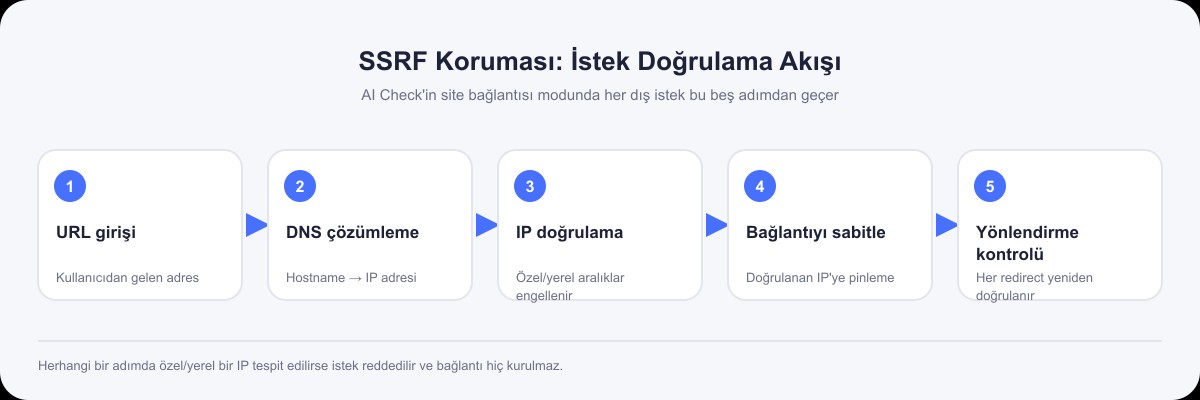
The real fix involves these steps:
- Resolve DNS first, then validate the IP. Check the actual IP address, not the hostname.
- Pin the connection to the validated IP, because the record can change in the milliseconds between DNS resolution and the actual connection (a TOCTOU, time-of-check to time-of-use, flaw).
- Re-validate every redirect. Even if the first address is safe, the server can redirect you to one that isn't.
- Block every private and local IP range. Not just
127.0.0.1, but10.0.0.0/8,172.16.0.0/12,192.168.0.0/16, link-local (169.254.0.0/16) and their IPv6 equivalents.
const addresses = await dns.lookup(hostname, { all: true });
if (addresses.some((a) => !isPublicAddress(a.address))) {
  throw new Error("Access to this link isn't allowed.");
}
// Pin the connection to the VALIDATED IP, not the hostname
const response = await request(url, {
  lookup: (_host, _opts, callback) => callback(null, addresses[0].address),
});
At this point I did trust the AI agent, but its third suggestion, not its first. The first two "looked like they worked"; the real weaknesses only came out when I asked about specific attack scenarios.
2. Zip bombs and file size limits
The document upload feature accepts DOCX files. A DOCX is really a ZIP archive, and the ZIP format has a well-known weakness: the compression ratio attack (zip bomb). A file of a few kilobytes can expand to gigabytes when unpacked and exhaust the server's memory.
The naive approach is to unpack the file completely and then check its size, but by then the damage is done. The right approach is to inspect the ZIP's central directory before unpacking: read each entry's uncompressed size from the ZIP metadata, add up the total expanded size and the number of entries, and reject the file without unpacking it if either goes over a threshold.
// Scan for the PK\x01\x02 signature and work out the size without unpacking
for (let i = 0; i + 46 <= buffer.length; i++) {
  if (buffer.readUInt32LE(i) !== 0x02014b50) continue;
  expandedSize += buffer.readUInt32LE(i + 24);
  entryCount++;
}
if (expandedSize > 20 * 1024 * 1024 || entryCount > 1000) {
  throw new Error("The document is too large once unpacked.");
}
The AI agent didn't suggest this the first time. When I said "check the file size", it wrote code that only looked at the size of the uploaded (compressed) file. I spotted the zip-bomb risk and asked about it separately. That's one of the most important lessons I've learned working with AI agents: if you don't ask the AI about an attack you don't know about, it won't tell you either.
3. Not trusting external API responses blindly
Using a response from an external service (a payment provider, an SMS service, a third-party API) directly is riskier than it looks. The service might change the shape of its response one day, return an unexpected error or, worse, be compromised.
So I check every response from an external service with schema validation, using zod. If expected fields are missing or the types don't match, the app fails loudly instead of quietly carrying on with the wrong data.
const schema = z.object({
  status: z.enum(["success", "failed"]),
  amount: z.number().positive(),
});
const parsed = schema.safeParse(await response.json());
if (!parsed.success) throw new Error("The provider returned an invalid response.");
It's a principle I also apply to PlusTurk's payment integrations: never process a "payment successful" message from a virtual POS provider in its raw form.
4. Rate limiting: capping requests that burn CPU
AI Check's text analysis runs on the CPU (a local statistical model that doesn't call any external service). That's great for cost, but it creates a different risk: someone sending hundreds of requests a second could exhaust the server's resources.
The simple but effective rule I applied: 5 requests per IP every 10 minutes, and at most 3 analyses running at once per server. These limits stop a single malicious user from locking up the system without affecting real users.
if (entry.count >= 5 || inFlight >= 3) {
  throw new CheckError("Request limit reached. Please try again in a few minutes.", 429);
}
A small note: this is enough for a single server instance, but once you scale horizontally across several servers you need a shared rate-limit store (such as Redis). If each server keeps its own counter, the total limit multiplies by the number of servers.
5. Never assuming input is safe
Every piece of data from a user (a file name, a form field, a URL, even the file itself) should be treated as potentially malicious. In practice that means:
- Validating a file by its actual content (magic bytes), not its extension. Someone can upload a file with a
.pdfextension whose content isn't a PDF. - Counting the size while reading the actual data stream, rather than trusting a request's
Content-Lengthheader. The header can lie. - Making sure requests that don't come from the same origin don't get their forms processed (a basic CSRF measure).
if (buffer.subarray(0, 5).toString() !== "%PDF-") {
  throw new Error("This file isn't a real PDF.");
}
Where I don't trust AI agents
After all these examples, I want to be clear: the AI agents suggested none of these security measures on their own. I asked about every one, I built the threat model, and the AI helped with the implementation. Concretely, there are three things I don't trust:
- The answer to "Is this secure?" AI agents usually give a confident "yes, this approach is secure". That's a guess, not verification. I always check security-critical code separately, myself or with a security toolchain (linters, static analysis).
- A tendency to "allow" by default. When you ask an AI to write an API, it usually takes the path of least resistance, which is often a structure that grants more permission than needed. I always set up authorisation myself on a "deny by default, allow explicitly" basis.
- Noticing a class of attack I don't know about. As with the zip-bomb example above, the AI doesn't think about a threat you don't ask about. So I regularly go through lists such as the OWASP Top 10 myself and ask, "Which of these could apply to this feature?"
A practical checklist
The questions I ask myself when building a new feature with an AI agent, especially one that takes external input:
- Did I ask the AI who could abuse this feature, and how, or did I go straight to asking for code?
- Am I validating data from an external source (a URL, a file, an API response) by its content, or only by its name, extension or headers?
- Is every resource limit (file size, number of requests, memory) explicitly defined, or left on the assumption that it "will be big enough"?
- Have I read this code once more through the eyes of a malicious user rather than a normal one?
- Did I accept the AI saying "this is secure" without real verification (tests, a linter, a manual review)?
Conclusion
AI agents make writing security code much faster, but not security thinking. Building the threat model, asking "how could this be abused?" and questioning the AI's first suggestion are still a human's job. The clearest lesson I took from building AI Check: treat the AI not like a security expert but like a fast, inexperienced junior developer. It gets the work done, but you have to check it afterwards.

Cantürk Çelikok
Freelance full stack developer based in Ankara, Türkiye. He built live products such as PlusTurk, Nerdesin, Ayda POS and Songnaria Coffee end to end, and shares the notes from those projects here.